The Office of the Registrar is responsible for course registration, class scheduling,
transfer credit evaluations, and the issuing of transcripts and diplomas, among other
services. You can find us in Room 119 (1st Floor) of the Administration and Conference
Center (ACC) on the St. Thomas campus and in Room 811 (3rd Floor) of the Evans Building
on the St. Croix campus.
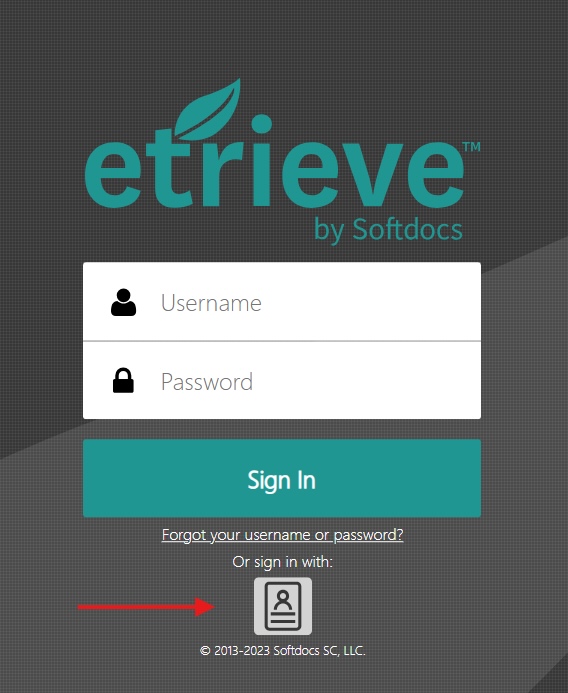
Forms are available through the eTrieve Central portal. You may be prompted to sign
in to MyCampus, or you will be directed to eTrieve Central if you are already logged
in. For easy access in the future, we recommend bookmarking the portal link.
Wait listing allows students the opportunity to be notified, via email, when a space
becomes available in a class that was fully subscribed, when they attempted to add
it to their schedule.
How Wait Listing Works
Whenever you attempt to register for a closed class to which a wait list is attached,
an error message will occur.
You will have the option to be placed on a wait list.
If you accept and are the first in line, once someone withdraws from the class, thus
making a space available, Banner will notify you of its availability via email.
You will have 24 hours from the generation of the email to add the class; failing
to do so, the offer will expire and be made to the next student in line.
While we are a test-optional institution, we do utilize SAT/ACT scores to determine
placement in college-level courses.
SAT Score Requirements
Students who score 560 or higher on the Reading and Writing sections and 520 or higher on the Mathematics section will be placed in college-level courses.
ACT Score Requirements
Students who score 21 or higher on the English and Reading sections and 20 or higher
on the Mathematics section will be placed in college-level courses.
Students who do not meet these requirements can register for Placement Testing.
The Post-9/11GI Bill®program is comprised of multiple payments.
You need to verify your attendance every month before payment is issued if you are
attending an Institution of Higher Learning (IHL) or Non-College Degree (NCD) program
and are receiving one of the following:
Montgomery GI Bill® - Active Duty
Montgomery GI Bill® - Selected Reserve
Reserve Educational Assistance Program - REAP
Veterans Retraining Assistance Program - VRAP
To verify your enrollment online go tohttps://www.gibill.va.gov/wave/index.doWeb Automated Verification of Enrollment (WAVE) . You can also call 1-877 VA-ECERT
(1-877-823-2378) to verify by telephone.You do not need to verify your attendance if you are attending an IHL or NCD programandreceiving the Post-9/11 GI Bill® .
Additional Information for Veterans:
Military Veterans Graduate School Guide, Click on the link below:
After their service, military members return home with a wealth of new, highly-valuable
skills. By pairing these skills with an advanced degree, veterans can set themselves
up for very productive, fulfilling, and successful civilian lives. This guide was
created to help veterans better understand masters degrees and graduate school financing
options some key elements of the guide include:
How military skills apply to various masters degrees
- Financial aid options -- GI Bills®, scholarships, grants - An overview of the grad school admission process and online opportunities
GI Bill® is a registered trademark of the U.S. Department of Veterans Affairs (VA).
More information about education benefits offered by VA is available at the official
U.S. government Web site at http://www.benefits.va.gov/gibill
How can I request to Change my personal information.
Current Students: Log in to MyCampus > Banweb > General. Under the "General" tab, you can view and update your address and other personal information.
Alumni and Former Students: If you cannot access Banweb, you may submit a request by completing the respective
form. To access the form, please visit Registrar’s Office website.
Please allow 2-3 business days for your request to be processed. Once the change is completed it is effective immediately.
How can I verify the information you have on file for me?
Current Students: Log in to MyCampus > Banweb > General. Under the "General" tab, you can view your address and other personal information.
Alumni and Former Students: If you cannot access Banweb, you may submit a request by completing the respective
form. To access the form, please visit Registrar’s Office website.
What documents do you need for an address change?
A comprehensive list of acceptable documents is provided on the address change form.
Relevant documents may include:
Court Order
Birth Certificate
Marriage Certificate
Passport
Social Security Card (SSN)
Driver’s License
Voter’s ID
How Can I find out if I have a hold?
You can view holds by logging into Banweb. Click on the Self Service for Students.
And then on Statement and Payment History and in the right corner you will see the
word Holds. When you select it will display if you have any holds or not.
How do I calculate my GPA?
The GPA is determined by dividing the total quality point earned by total credit hours
attempted for grades of A, B, C, D and F. The highest grade in courses which have
been repeated is used in the calculation.
What is an Incomplete grade?
Incomplete grades are expected to be used only when, in the opinion of the instructor,
the student is passing the course at the time grades for the current semester are
due, or when in the opinion of the instructor, there is likelihood that the student
can satisfactorily complete the missing work which will influence the final grade.
The instructor and student must define the terms under which the incomplete course
work will be completed. The incomplete grade must be removed by mid-term of the semester
following the one in which the grade of “I” was earned.
How can I request an Incomplete grade?
To request an incomplete grade, the student must submit a Request for Incomplete Grade form
to the instructor.
How can I qualify for Residency Tuition?
To qualify for Residency Tuition, you must complete the Certification of Residency
Form and provide the required supporting documents. These documents include tax returns,
lease agreement, or utility bills. Additional requirements may apply based on your
circumstances. To access the form, please visit Registrar’s Office website.
How do I withdraw from the University?
To withdraw from the University, you must complete the Withdrawal Form and submit
it to the appropriate office. If you are attempting to withdraw after the specified
deadline (refer to the Academic Calendar for dates), you will also need to obtain
approval from your Dean for an Administrative Withdrawal. For more details and to
access the form, please visit Registrar’s Office website
What is the Federal Education Rights and Privacy Act (FERPA)?
FERPA protects the privacy of student education records. FERPA gives parents certain
rights with respect to their children's education records. These rights transfer to
the student when he or she reaches the age of 18 or attends a school beyond the high
school level. Students to whom the rights have transferred are "eligible students."
How long does it take for a grade change to be processed?
Grade change requests submitted by instructors or deans are typically processed within
2-3 business days. However, there are instances where additional review or approvals
may be required, which could extend the processing time. Once finalized, the updated
grade will reflect in your academic record. For any questions or concerns, please
contact the Registrar's Office.
What is the difference between Add/Drop and Withdrawing from a class?
Add/Drop: This refers to making changes to your course schedule within the designated Add/Drop
period at the beginning of the semester (check the Academic Calendar for specific dates). Adding or dropping a class during this period will not appear
on your transcript.
Withdrawing: Withdrawing from a class happens after the Add/Drop period has ended. When you withdraw,
the course remains on your transcript with a grade of "W," which does not affect your
GPA. Withdrawals must be completed by the withdrawal deadline specified in the Academic Calendar.
If you are attempting to withdraw after the specified deadline (refer to the Academic
Calendar for dates), you will also need to obtain approval from your Dean for an Administrative Withdrawal.
What is the difference between Withdrawing and administratively withdrawing from a
class?
Withdrawing: A student-initiated process that must be completed before the withdrawal deadline
listed in the Academic Calendar. The course will appear on your transcript with a
grade of "W," which does not affect your GPA.
Administratively Withdrawing: Students who are unable to complete coursework due to unusual circumstances may request
an Administrative Withdrawal after the University’s official withdrawal date. This request requires approval from
the dean and may result in a grade of "W" on the transcript, depending on the situation.
Students are required to provide documentary evidence in support of requests for administrative
withdrawal. Applications will not be accepted after the last day of instruction within
that semester.
When is the last day to Add/Drop/Withdraw from a class and where can I obtain the
form?
Please refer to the Academic Calendar for the specific deadline dates for adding,
dropping, or withdrawing from a class. To make schedule adjustments, you must complete
the appropriate form. For more details and to access the form, please visit Registrar’s Office website
If I withdraw from classes, will it affect my GPA?
No, but please be mindful it may affect your Financial Aid.
If I request to take more than 16.5 credit hours (overload), will I incur additional
charges for the additional credits?
Yes, you will be charged per credit hour for each additional credit. For more information,
please review the tuition & fees.
What classes are available for registration?
You can view the classes available for registration by visiting the class schedule. This schedule provides a list of all courses offered for the upcoming term, including
course times, locations, and prerequisites. Current students can register for classes,
you can access the registration portal through your student account. Students that
cannot access Banweb may submit a registration form by visiting the Registrar’s Office website.
What is the process for registration?
Meet with your advisor: All students must meet with their academic advisor to discuss course selection and
ensure they are on track to meet degree requirements.
Obtain your PIN: After meeting with your advisor, you will receive your registration PIN.
Register via MyCampus: Once you have your PIN, you can register for classes through MyCampus (Banner Self
Service).
If you encounter errors during registration (such as prerequisite errors or trying
to enter a closed class), you may please visit Registrar’s Office website and complete the respective form for assistance.
Who is my advisor?
Your academic advisor is assigned based on your class standing:
Freshmen and Sophomore Students: You can visit the Center for Student Success (CSS) for advisement.
Junior, Senior, and Graduate Students: Your advisor is typically assigned within your department, and you must meet with
your faculty advisor, not a CSS advisor, to be cleared for registration.
All students can find their advisor information by logging into MyCampus > Banweb > Student > Student Profile x9. Once there your advisor is listed.
Meeting with your advisor each semester is important to ensure you are on track to
complete your degree requirements. Once advised, you will receive your registration
PIN and can register for classes via Banner Self Service.
How can I change my advisor?
If you believe your advisor is incorrect or would like a new assignment, please contact
the school or college for your major.
Can I get an override into a closed course?
In some cases, you may be able to request an override to enter a closed course. To
do so, you will need to complete the Request to Enter Closed Class form. To access
the form, please visit Registrar’s Office website
When do I need to apply for graduation?
You should apply for graduation at the beginning of the semester in which you plan
to complete all degree requirements. For more information on the graduation process,
please visit: https://www.uvi.edu/registrar/commencement.html
Deadlines to submit Applications for Graduation to the Registrar’s Office are as follows:
First Friday in November for December Graduation
Last Friday in March for May Graduation
Please note that applications submitted after these dates will be accepted by the
Registrar’s Office but do not carry any commitments regarding graduation processing
and may require additional approval.
What are the degree requirements for graduation?
To ensure you meet all degree requirements, consult your departmental advisor. All
requirements must be completed by the last day of final examinations in the semester
in which you intend to graduate. Your department is responsible for clearing you for
graduation and certifying to the Office of the Registrar that all requirements have
been met. We strongly recommend that you consult with your academic advisor prior
to your final semester to confirm you will meet all graduation requirements.
Reminders:
Evaluation of Transfer Work: All transfer credit must be evaluated and posted to your academic record. Official
transcripts from prior institutions should be submitted for evaluation before your
expected graduation date. Check your transfer credits in Banner to ensure all expected
credits have been posted.
Concurrent Enrollment: Attending another institution during your final semester may impact your graduation.
Please consult your academic advisor if you plan to enroll elsewhere.
How do I obtain a copy of my official transcript?
All transcript requests must be made with parchment. Please refer to the Transcript page and follow instructions.
The transcript cost is $10.00 per copy. Please allow 5 business days for processing
time.
How do I obtain verification of enrolment?
*Enrollment verifications may be provided upon request. There is no fee for this service.
Enrollment verification includes the following information:
The Office of the Registrar is located on the 1st floor of the Administration and Conference Center (ACC), Rm. 119
on the St. Thomas Campus and the 3rd Floor of the Evans Building on St. Croix.
Orville E. Kean Campus - St. Thomas P: 340-693-1160
Albert A. Sheen Campus - St. Croix P: 340-692-4104